Release Notes
September 2026
New features
New AI models
- Multi-provider support: BYO AI providers like Anthropic or Google, and use their models in Theta Assist. Azure, AWS and other model hosts are supported.
- Support for GPT-6 Astra (released to the staged model access profile) and GPT-image-2.5
Analytics
- ROI indicator: view how much time AI estimates you have saved by using Theta Assist for this task. You can also provide feedback on how much time this actually saved you.
- Personal usage insights available to all users via the Insights tab.
Useful extras
- Compaction - keep replies faster and cheaper, while still allowing the assistant to continue its task.
- Create reusable batch process presets to make repeatable file and data tasks easier to run - advanced feature for technical users.
- Return a shared thread link when triggering a scheduled job using Power Automate.
- Export an assistant as a package, then import it back into Theta Assist. You can use this to make a copy of an assistant and then make/test changes while retaining the original.
UI changes and improvements
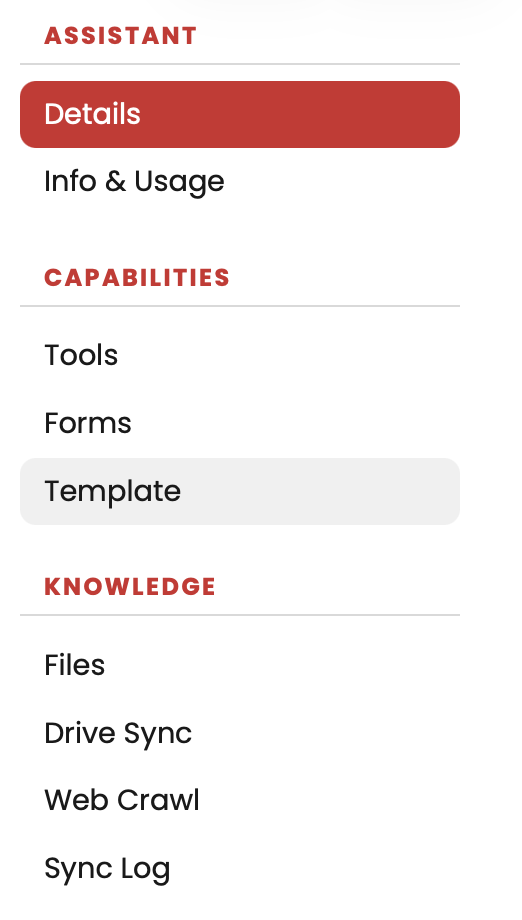
- When editing an assistant, settings are grouped into a clearer navigation menu on the left of the page, instead of tabs across the top.
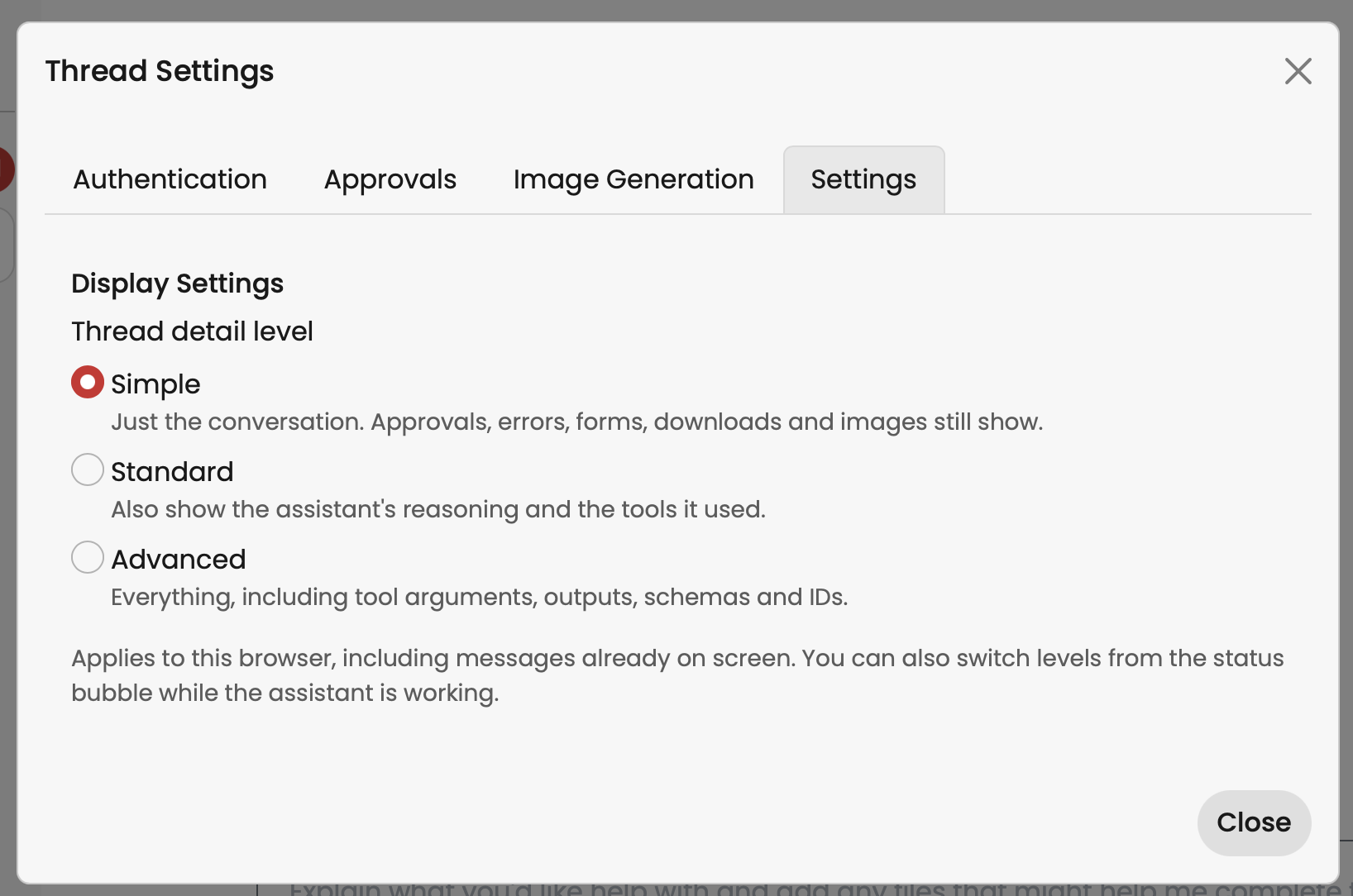
- Choose whether to show tool activity and reasoning in threads (access via wrench menu)
- SharePoint file links now use clearer, shorter display names in conversations.
- Drive Sync shows clearer progress and completion information, with logs for individual syncs.
- Improved saving and validation when configuring MCP servers.
Enhancements
- Schedule jobs to run on weekdays.
- Improved reliability when uploading and working with large Excel files.
- CSV files downloaded through Microsoft 365 tools can now be read as text.
- Improved batch job handling, including clearer recovery from stalled, pending and cancelled runs.
- Assistant responses that stall now show clearer status and recovery options.
- Improved handling of Microsoft 365 rate limits.
- Improved access to files in shared threads and sharing with custom groups.
- Improved security and model availability checks.
Beta features
Contact us to try these out
- Support for voice input
- Theta Assist browser extension
- Skills
28 July 2026
New features
- Support for GPT-5.6.
- “Model staging” access profiles allow admins to control access to and rollout of newer and more expensive models.Excel editing tools added to Microsoft 365 tools, making it easier to update worksheets and work with spreadsheet content.
- File citation controls: remove file citations by default at the assistant level or for an individual thread.
Enhancements
- Updated Planner comments handling to accommodate the new Microsoft API.
- Non-PDF and Markdown citations now scroll to the source reference when selected.
2 July 2026
UI changes
- Assistant controls (favourite, edit or info, and share) now appear on the left above your threads.
- Collapse the threads sidebar for more space.
- In a thread, the back button returns you to where you were instead of the Home page.
- The top navigation bar stays visible in a thread.
New features and enhancements
- Set the size and quality for generated images. Learn more.
- Image input, up to 10 images, supported on Azure plans.
- New prompt button options.
- Microsoft 365 tools now support reading SharePoint lists.
- Create and use Forms to collect structured information from users.
- Use Drive Sync to keep assistant files up to date from SharePoint automatically. See the admin guide.
8 May 2026
- Added a dedicated assign or unassign user tool to the Microsoft Planner integration.
- Usage analytics enhancements.
4 May 2026
New features
- Support for GPT-5.5.
- Microsoft Planner integration.
- Download a thread as Markdown for reuse or reference.
- Support for .vtt files as attachments and assistant files, making it easier to work with transcript content.
- New admin features for model management.
- Token consumption metrics for admins.
- A context usage indicator, allowing users to see how much of the conversation’s available context window has been used.
Enhancements
- Thread sharing via universal share links.
- Image generation improvements, including support for OpenAI’s gpt-image-2. This improves compatibility with newer image generation capabilities, image sizing, preview rendering and loading behaviour. Not currently available on Azure plans.
27 March 2026
New features
- Jobs
- Run tasks in the background and track their progress.
- Set up recurring scheduled jobs to automate regular work.
- Batch processing tools
- Use batch processing tools to run the same task across multiple files or MCP outputs efficiently. Learn more.
- Microsoft 365 email features
- Draft emails and replies in Outlook, and send email to yourself. Learn more.
Enhancements
Available tools are shown when a user switches model, so you can see whether a model supports capabilities such as Code Interpreter.
Beta feature
The cURL Executor MCP Server lets an assistant send HTTP requests to approved external endpoints for lightweight integrations, including calling webhooks, sending data to external systems, querying REST APIs and triggering automation flows. Contact us if you are interested in trying this.
14 March 2026
New model
- Model support for GPT-5.4 variants, not on Azure. Learn more about GPT-5.4 capabilities.
Enhancements
Scroll while the AI is working so you can review earlier responses in a thread.
New admin features
- A tool to migrate assistants to new models. Go to Configuration > Migrate models in the Admin menu.
- Access profiles let you control who can use specific MCP servers. Go to Management > Access profiles in the Admin menu.
Beta features
Contact us if you are keen to learn more about scheduling jobs, multi-file batch processing, or enhanced Microsoft 365 tools for Excel spreadsheets, email attachments and email-to-self.
16 December 2025
New capabilities
- Model support for GPT-5.2 variants, not on Azure.
- Assistant certification. Assistant authors can submit an assistant for review. Approved assistants are badged as certified to help users identify reliable, reviewed assistants.
Enhancements
- Assistant thread message timestamps include the model used.
- Handling for files with uppercase extensions, such as .PDF.
- Threads using Code Interpreter no longer experience container expiry errors.
27 November 2025
New capabilities
- Connectors and MCP support let you connect to external data sources and tools. An admin must enable this.
- New sharing capabilities, including sharing assistants and threads with groups and individuals.
- Model support for GPT-5.1 variants.
- Paste or drop images into chat and view them inline instead of as attachments.
New admin features
- Admin menu reorganised across fewer tabs.
- When admin approval is required for sharing, email notifications are sent automatically to admins.
New views
The Threads view lets you view and search your threads, including threads shared with you. You can pin, share, rename and delete threads from this view.
Other enhancements
- Added timestamps to thread messages.
- Improved error messages.
- Dark theme enhancements.
- Better handling of large files, including intermittent performance impacts during large file uploads.
30 September 2025
New capabilities
Keep track of changes to your system prompts.
New admin features
- Push an assistant or set of assistants to users’ Home pages.
- Analytics dashboard shows usage by assistant, user, event and date or time.
New views
In the Library, view all assistants shared with you.
10 September 2025
New capabilities
Image generation, not available when using your own Azure OpenAI service.
Code Interpreter for more complex data analysis, coding and maths tasks.
Upload .xlsx, .csv and .xml files as message attachments in a conversation.
Models
- Access more models, including GPT-5.
- Change models used by assistants on Azure plans.
Web search has changed
Web search is available by default to all assistants. You can turn it off for an assistant you own.
Other enhancements
When file search is used, the assistant shows searched files above its answer. When using a reasoning model, reasoning steps are shown above the answer.
21 July 2025
- New Assistants view for administrators: search for and view all assistants in one place, and transfer ownership.
- Specify a default assistant to appear on new users’ Home pages.
- Let users see all assistants they have created in the Mine tab in Library.
July 2025
A WYSIWYG editor for system prompts makes it easier to create an assistant. You can still use Markdown.
Admin functions — new settings
- Make advanced options an admin-only feature.
- Admins can reassign assistant ownership or take over assistants.
- Require admin approval before assistants can be shared.
- List all unlisted assistants in the library.
Other enhancements
- Warn when deleting a shared assistant.
- Detect and warn when uploading protected or encrypted documents.
- Search the Library by author.
- Clearer persistent warning for memory-enabled assistants.
- Favourite an assistant from the Home screen.
June 2025
- Library: view assistants you can access, favourite them or add them to your Home page.
- Web search: allow your assistant to search the web to help formulate responses.
- Assistant memory: an assistant can access conversations with that assistant across all users. Learn more about sharing sensitive information.
- New thread options.
- Drag and drop files or images into a thread.
- Date awareness: assistants are aware of the current date.
April 2025
- Web crawler: connect an assistant to selected web sources for accurate, relevant and referenced responses based on your website content.
March 2025
- API support for advanced integrations:
- File Sync API for connecting SharePoint and Teams files using Power Automate.
- Messages API for integrating an assistant into external programs or systems.
- Upload files up to 250 MB.
- Admins can set the default system prompt used for new assistants.
- A default assistant is created for new installations.
February 2025
- Theta Assist is available as a Microsoft Teams app.
- Theta Assist is available in the Azure Marketplace.
- Template capability helps automate and standardise compliant, on-brand documents.
December 2024
- Shared assistant access: share edit and view access with specific people or everyone, enabling shared ownership.
- Thread sharing: share a thread with specific people or everyone to share your working.
- UX improvements: search for an assistant, favourite an assistant to pin it first, and show only favourites.
- Image support: upload image files and use GPT-4o image capabilities, including image descriptions and handwriting transcription.
- CSV output: assistants can generate CSV that you can save. Add this instruction to your prompt:
If asked to output csv include the language as ```csv. - Web page support: Theta Assist can fetch content from a web page as well as files.
- Default language support: the master prompt for new assistants uses the customer’s country as a guide.
- Administration: a new admin page lets you change settings and maintain administrators.