M365 Tools MCP server | Admin guide
This guide explains how system administrators can set up the M365 Tools MCP server in Theta Assist.
Use this guide when you need broader Microsoft 365 capability than the standard built-in connectors provide.
See also:
- Connectors | Admin guide
- Authentication configurations | Admin guide
- MCP servers | Admin guide
- Adding tools and connectors to your assistant
- Connect Microsoft 365 apps like Outlook and Teams
- Planner MCP tool | Admin guide
The M365 Tools MCP server provides broader Microsoft 365 access than the standard built-in connectors. It gives assistants access to email, calendars, Teams, chats, files, SharePoint, OneDrive, people, recent files, Planner, and Excel workbook data.
Quick links
- Overview
- M365 Tools vs standard Microsoft connectors
- Built-in Theta Assist MCP server
- What the M365 Tools MCP server can do
- Available tools
- Excel editing safety and workspace restrictions
- Excel workbook support and limitations
- Admin setup overview
- App registration permissions
- Extra permissions if you already use standard Microsoft connectors
- Suggested rollout approach
- Notes
Overview
The M365 Tools MCP server allows Theta Assist to work with Microsoft Graph data using delegated user access. In most cases, this means the assistant acts only within the permissions of the signed-in user.
Compared with the standard Microsoft 365 connectors, this MCP server supports a wider range of actions, including:
- reading emails and attachments
- reading calendars and shared calendars
- retrieving Teams meeting transcripts
- searching across OneDrive, SharePoint and Teams files
- reading Teams channel posts and chat messages
- looking up people and directory details
- listing recent and shared files
- reading Excel worksheets, ranges, tables, and charts
- rendering Excel charts as inline images in chat
- editing supported Excel workbooks inside the configured AIWorkSpace folder when enabled by an administrator
- sending an email to the signed-in user
- drafting a new email or reply to an existing email, ready to review and send in Outlook
- working with Planner tasks (see separate setup guide)
M365 Tools vs standard Microsoft connectors
| Option | Where admins set it up | Best for |
| Standard Microsoft connectors | Admin > Tools > Connectors | Simpler built-in Microsoft access with narrower, mostly read-focused capability |
| M365 Tools MCP server | Admin > Tools > MCP Servers | Broader Microsoft 365 capability with a wider set of actions and deeper Graph-based access, including richer Excel workbook support |
If the standard Microsoft connectors already meet your needs, see Connectors | Admin guide.
If you need broader Microsoft 365 capability, use M365 Tools.
Built-in Theta Assist MCP server
The M365 Tools MCP tool is a built-in Theta Assist MCP server.
You do not need to manually enter a custom MCP endpoint URL for this integration.
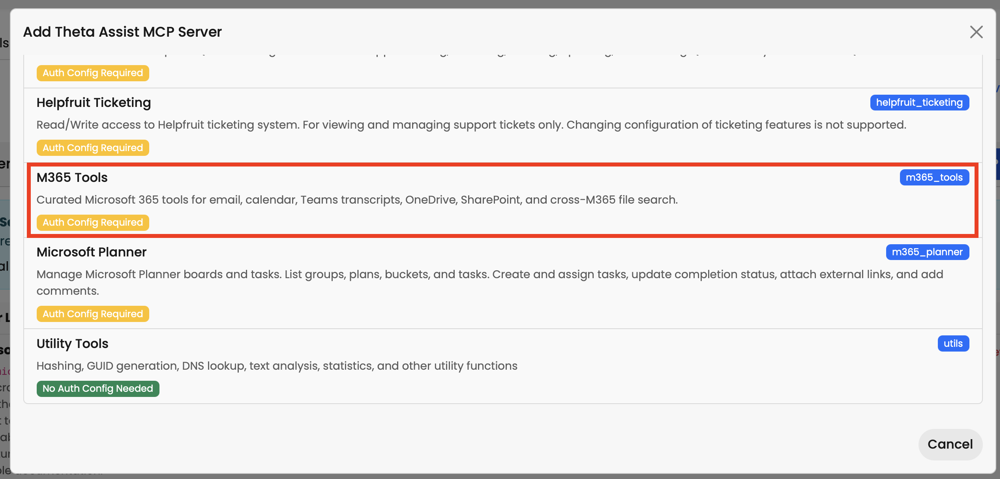
To add the M365 Tools MCP tool:
- Go to Admin > Tools > MCP Servers.
- Click the green + Theta Assist MCP Server button.
- Select the M365 Tools option.
- Attach the appropriate Microsoft authentication configuration.
- Set the approval policy and save.
What the M365 Tools MCP server can do
Email and mailboxes
The server can:
- list email messages
- fetch full message content
- download email attachments
- search for shared or delegated mailboxes
- create draft emails
- create draft replies to existing messages
- send an email to self
Calendar and meetings
- search calendar events
- read calendar attachments
- retrieve Teams meeting transcripts from meeting join links
Files and documents
- search across Microsoft 365 files
- browse OneDrive and SharePoint folders
- download supported files
- read Excel workbook content by worksheet, range, table, and chart
- render Excel charts as inline images in chat
- edit supported Excel workbooks inside the configured AIWorkSpace folder when enabled
- read SharePoint Lists
Teams and chats
- list joined Teams and channels
- read channel conversations and replies
- list personal and group chats
- search Teams messages
People and profile data
- return the signed-in user profile
- look up colleagues
- find relevant people and contacts
- list recent, used, and shared files
Available tools
The M365 Tools MCP server includes tools across email, calendar, files, Teams, people, and Excel.
ta_m365_list_emailsta_m365_get_emailta_m365_get_email_attachmentta_m365_find_mailboxta_m365_create_draft_emailta_m365_create_draft_replyta_m365_send_email_to_self
Calendar and meetings
ta_m365_get_calendar_eventsta_m365_get_calendar_attachmentta_m365_get_meeting_transcript
File search, OneDrive and SharePoint
ta_m365_search_filesta_m365_onedrive_searchta_m365_onedrive_listta_m365_onedrive_downloadta_m365_sharepoint_find_siteta_m365_sharepoint_get_drivesta_m365_sharepoint_searchta_m365_sharepoint_listta_m365_sharepoint_downloadta_m365_sharepoint_find_listta_m365_sharepoint_get_list_schemata_m365_sharepoint_query_list
Teams
ta_m365_teams_list_joinedta_m365_teams_list_channelsta_m365_teams_channel_files_rootta_m365_teams_group_driveta_m365_teams_get_channel_messagesta_m365_teams_get_channel_repliesta_m365_teams_list_chatsta_m365_teams_get_chat_messagesta_m365_teams_search_messages
People, profile and productivity
ta_m365_get_userta_m365_find_peopleta_m365_recent_filesta_m365_send_email_to_self
Excel
Excel support uses Microsoft's supported Graph Workbook API.
Reading tools:
ta_m365_excel_get_worksheetsta_m365_excel_read_rangeta_m365_excel_list_tablesta_m365_excel_list_chartsta_m365_excel_get_chart_image
Editing tools:
ta_m365_excel_update_rangeta_m365_excel_add_table_rowta_m365_excel_add_worksheetta_m365_excel_create_table
Excel editing safety and workspace restrictions
Excel editing is protected by two separate controls.
- Admin switch. The existing Enable AIWorkSpace file writes setting in Admin > M365 Tool Settings also controls whether Excel editing tools are available. When this setting is off, Excel editing tools are not offered to the assistant. Excel reading tools are unaffected.
- Location restriction. Even when Excel editing is enabled, the assistant can only edit workbooks stored inside the configured workspace folder, which is AIWorkSpace by default, or one of its subfolders.
If the assistant attempts to edit a workbook outside the configured workspace folder, the request is refused and no change is made.
This matches the existing workspace file write behaviour, so administrators manage one consistent safe area for assistant-created or assistant-edited files. Learn more
Excel workbook support and limitations
- Only modern
.xlsxworkbooks are supported. - Legacy
.xlsworkbooks are not supported. - Workbooks must be stored in OneDrive for Business, SharePoint, or Teams.
- Personal Microsoft accounts and consumer OneDrive are not supported.
- Changes are saved directly to the workbook.
Admin setup overview
To set up the M365 Tools MCP server:
- Create or update a Microsoft Entra ID app registration.
- Add the required Microsoft Graph permissions.
- Grant admin consent where required.
- Reuse or create a Microsoft authentication configuration in Theta Assist.
- Go to Admin > Tools > MCP Servers.
- Click the green + Theta Assist MCP Server button.
- Select M365 Tools.
- Choose the authentication configuration.
- Review Admin > M365 Tool Settings if you want to enable Excel editing or change the workspace folder name.
- Set approval policy and access controls.
- Test with a limited admin or pilot group first.
For shared authentication setup guidance, see Authentication configurations | Admin guide.
For general MCP setup guidance, see MCP servers | Admin guide.
App registration permissions
Important: If you already have an app registration for the existing Microsoft 365 connectors, you can usually extend that same app registration by adding the extra permissions. The next section shows the main differences.
Required permissions
| Permission | Type | Purpose |
Calendars.Read |
Delegated | Read user calendars |
Calendars.Read.Shared |
Delegated | Read user and shared calendars |
Channel.ReadBasic.All |
Delegated | Read the names and descriptions of channels |
ChannelMessage.Read.All |
Delegated | Read user channel messages |
ChannelSettings.Read.All |
Delegated | Read the names, descriptions, and settings of channels |
Chat.Read |
Delegated | Read user chat messages |
Contacts.Read |
Delegated | Read user contacts |
Directory.Read.All |
Delegated | Read directory data |
Files.Read |
Delegated | Read user files, including Excel workbook reading |
Files.Read.All |
Delegated | Read all files that user can access |
Files.ReadWrite |
Delegated | Read and edit supported files, including Excel workbooks in the configured AIWorkSpace folder |
Group.Read.All |
Delegated | Read all groups |
Mail.Read |
Delegated | Read user mail |
Mail.ReadWrite |
Delegated | Read and write (draft) access to user mail |
Mail.ReadWrite.Shared |
Delegated | Read and draft mail in shared or delegated mailboxes that the signed-in user can access |
Mail.Send |
Delegated | Send mail as a user |
MailboxSettings.Read |
Delegated | Read user mailbox settings |
offline_access |
Delegated | Maintain access to data you have given it access to |
OnlineMeetingRecording.Read.All |
Delegated | Read all recordings of online meetings |
OnlineMeetings.Read |
Delegated | Read user's online meetings |
OnlineMeetingTranscript.Read.All |
Delegated | Read all transcripts of online meetings |
openid |
Delegated | Sign users in |
People.Read.All |
Delegated | Read all users' relevant people lists |
Presence.Read.All |
Delegated | Read presence information of all users in your organisation |
profile |
Delegated | View users' basic profile |
Sites.Read.All |
Delegated | Read items in all site collections |
Tasks.Read |
Delegated | Read user's tasks and task lists |
Team.ReadBasic.All |
Delegated | Read the names and descriptions of teams |
User.Read |
Delegated | Sign in and read user profile |
User.ReadBasic.All |
Delegated | Read all users' basic profiles |
To use shared or delegated inboxes, add Mail.ReadWrite.Shared to the Microsoft app registration used for connectors and M365 Tools, then grant admin consent.
For Excel workbooks, reading requires Files.Read. Editing requires Files.ReadWrite.
Extra permissions if you already use standard Microsoft connectors
If your organisation already uses the standard Microsoft 365 connectors, the following are the main additional permissions typically needed for the M365 Tools MCP server:
Calendars.Read.SharedChannelSettings.Read.AllDirectory.Read.AllFiles.Read.AllFiles.ReadWriteGroup.Read.AllMail.ReadWriteMail.ReadWrite.Shared— required to read and write shared or delegated inboxes that the signed-in user can accessMail.SendMailboxSettings.ReadOnlineMeetingRecording.Read.AllOnlineMeetings.ReadOnlineMeetingTranscript.Read.AllPeople.Read.AllPresence.Read.AllTasks.ReadUser.ReadBasic.All
Why these permissions are needed
These additional permissions enable broader MCP functionality such as:
- shared calendar access
- Teams transcript access
- wider file discovery across Microsoft 365
- people and directory lookups
- sending mail to self
- richer Teams and organisational context
- Saving and editing files inside the configured workspace folder
- Planner-related access where relevant
For Planner permissions and further details, see Planner MCP tool | Admin guide.
Suggested rollout approach
For initial rollout,we recommend you:
- extend your existing Microsoft app registration rather than creating a duplicate one
- grant the additional permissions listed above
- create a separate Theta Assist authentication configuration for the M365 MCP server if you want to keep it separate from the built-in connectors
- optionally set the MCP server approval policy to Always require approval during testing
- restrict access using Access Profiles if only some assistant authors should be able to add the server
- review Admin > M365 Tool Settings and decide whether to leave Enable AIWorkSpace file writes off or enable it for controlled writing and editing files in SharePoint & OneDrive
- add a new assistant with the tool and validate scenarios such as email access, calendar search, transcript retrieval, file search, Teams retrieval, Excel reading, chart rendering, draft email flows, and Excel editing inside the workspace folder
- confirm that file saving and editing is refused outside the configured workspace folder
Notes
- All access is based on delegated permissions, so the assistant can only act on data the signed-in user already has access to.
- The permission set for this MCP server is broader than the standard connector setup and should be reviewed by your Microsoft 365 administrator and security team.
- If you already use Microsoft connectors in Theta Assist, this is typically an extension of your existing setup, not a full rebuild.