Sharing assistants and sensitive information in Theta Assist
When using Theta Assist, it’s important to understand how sharing an assistant can expose any sensitive data it contains. Here’s some information to guide safe use.
What happens when you share an assistant?
If you create an assistant in Theta Assist and include sensitive data—such as salary details—in the assistant’s background information (i.e., files and system prompts), anyone you share that assistant with will be able to access that data.
Think of it like attaching a document to an email: if the document includes sensitive information and you email it to someone, they will be able to see that information. Assistants work in a similar way.
Is anything private in a shared assistant?
Conversations you have with the assistant are private to you. These won't be shared unless you explicitly copy or share the conversation thread. This includes files you upload as part of the conversation.
What is shared?
Memory
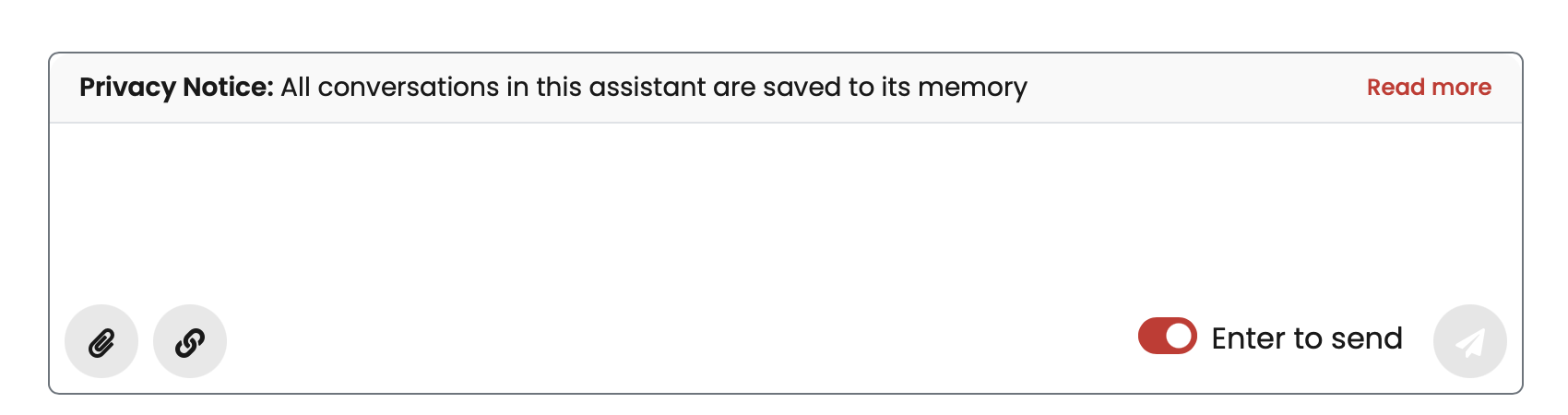
If your assistant has the “memory” feature enabled, all conversations can be accessed across the assistant, even if you haven't explicitly shared the conversation. You'll be alerted when this setting is on:
Assistant background information
Background information is shared. This includes any uploaded background files or information inside the assistant instructions (system prompt) configured as part of the shared assistant.
Best practice
- Do not share assistants with sensitive information with people who shouldn't have access to it.
- If your assistant includes confidential data, such as payroll details or personal information, don't share it broadly. Only share it with people who should have access.
- Give 'view only’ access to people you want to use the assistant but who shouldn't share it with others or edit it.
Summary
- Only background content (files and prompts) is visible to others using a shared assistant.
- Conversations with an assistant are private by default, including files uploaded in that conversation.
- Be cautious about what you embed in the background when setting up an assistant you plan to share.
- If an assistant has the memory feature enabled, it will have access to all conversations across the assistant, and any user can ask questions about any other user’s conversation.